

Start with one date and one real item.
Open largerPut nonmonthly costs on a plan you can actually review
Turn the bills, targets, reserves, and dates you enter into a clear 24-month map — without linking accounts or relying on hidden estimates.
Everforge Annual Expense & Sinking-Fund Map
- See annual and user-estimated costs across 24 months.
- Keep your targets, reserves, dates, and priorities visible beside the calculations.
- Review which items are funded, due now, overdue, or missing details.
- Use a print pack to record decisions and monthly reviews away from the screen.
- Keep the core workflow local, with no bank connection or subscription.
Local files
No bank connection or subscription.
Visible formulas
Nothing hidden behind a black box.
Real screens from the files you get
A practical spreadsheet system for giving annual bills and user-estimated replacement costs a dated place to live.
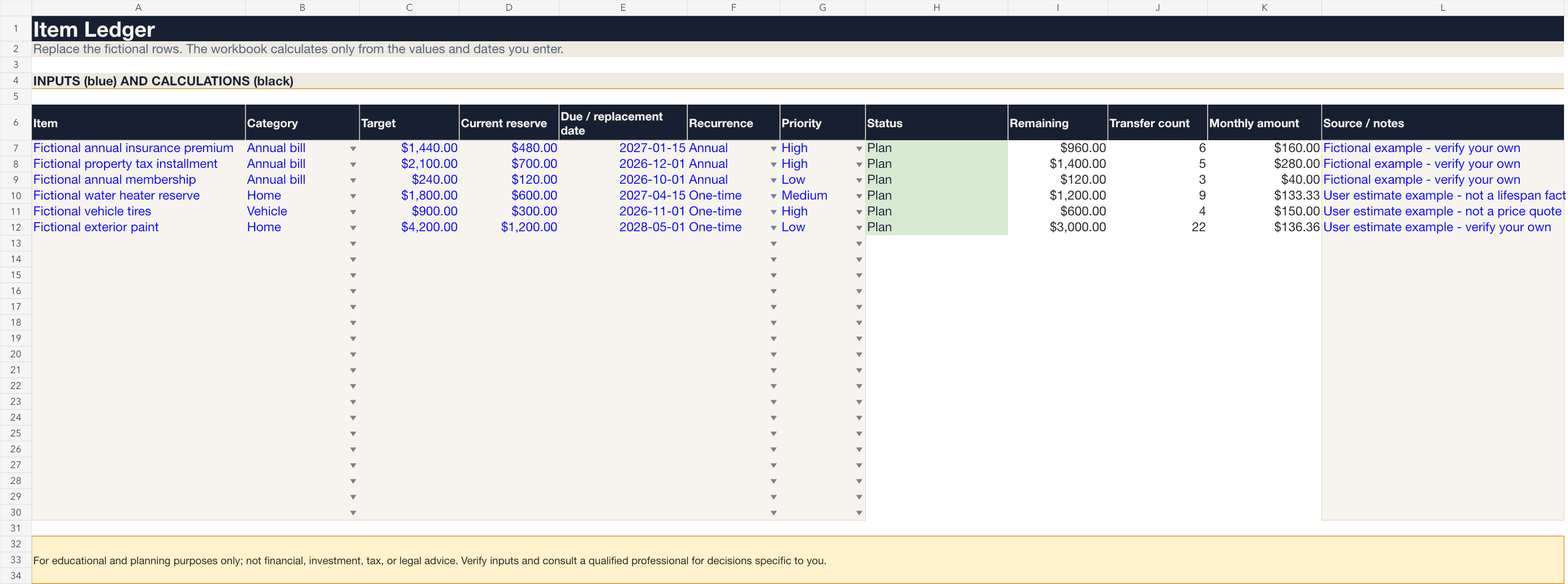
Enter targets, reserves, and dates; keep assumptions visible.
Open larger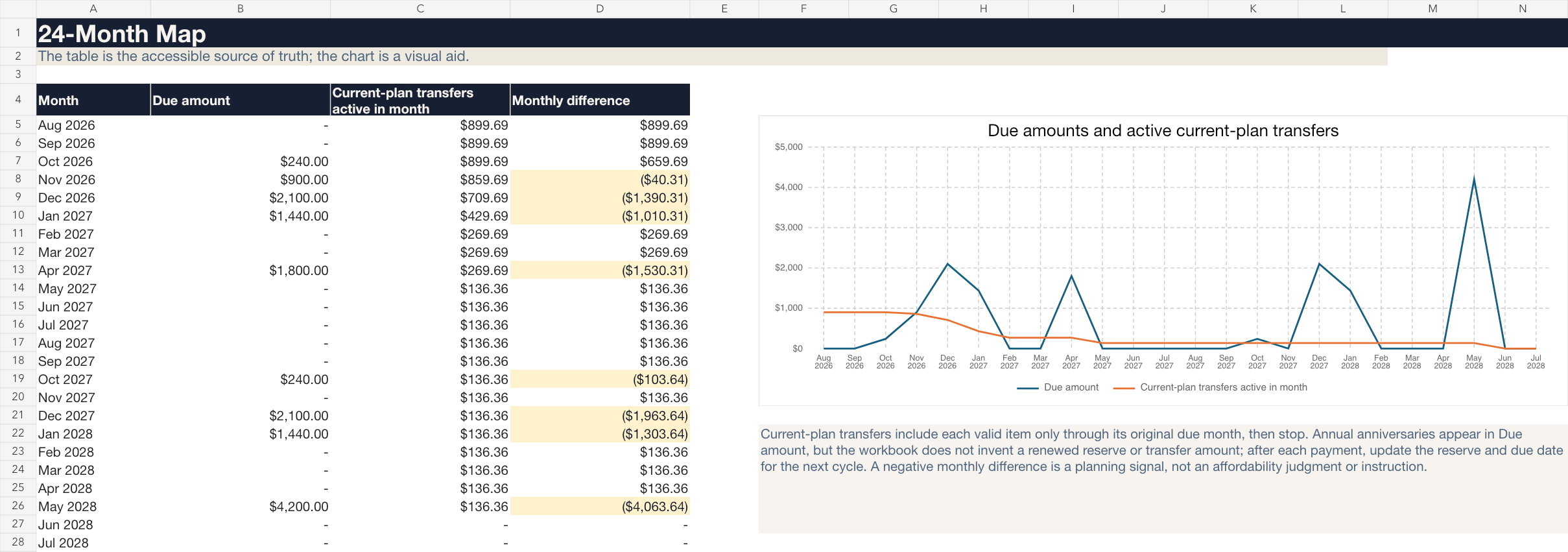
See due-month pressure across the next 24 months.
Open larger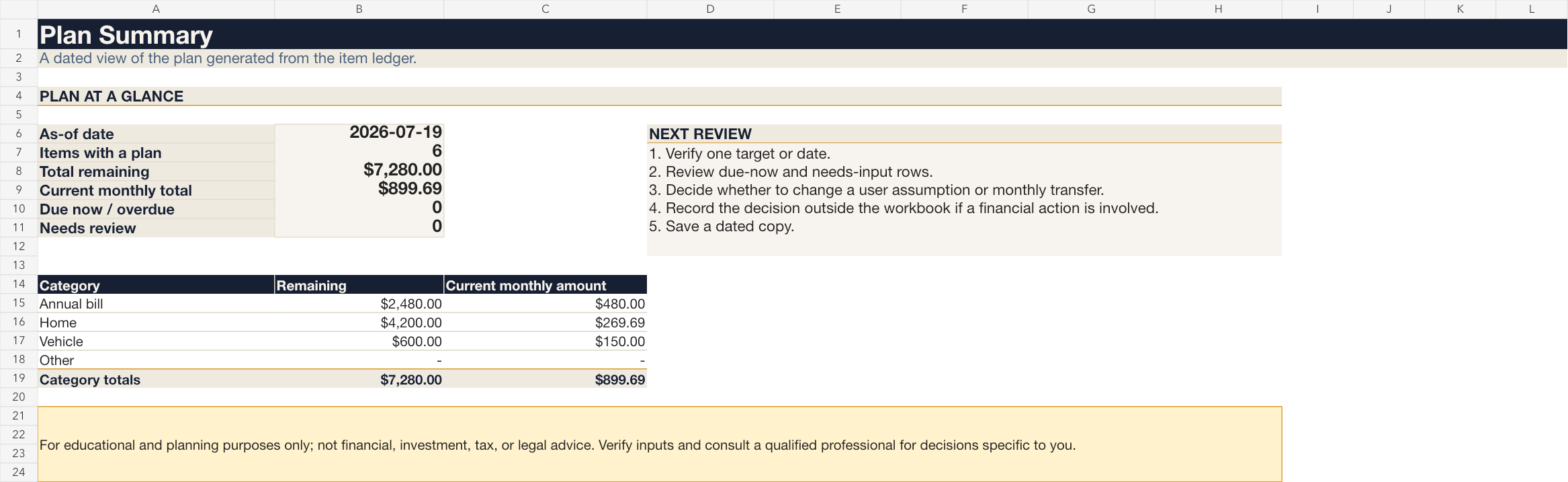
Review the plan, then choose your own next action.
Open larger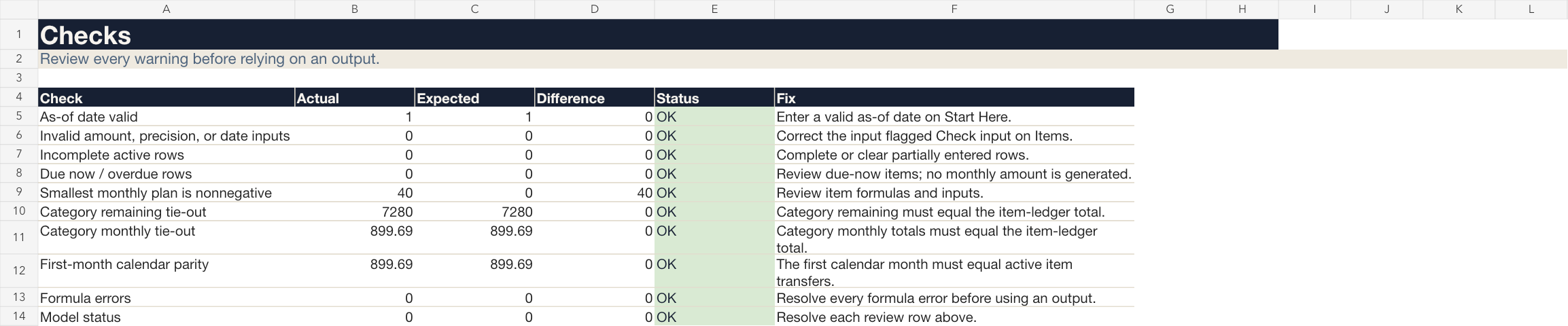
Visible checks expose incomplete inputs and formula errors.
Open largerFiles in this download
- Editable Excel workbook.
- Setup guide PDF and a fictional sample-summary PDF.
- US Letter and A4 print packs.
- Fictional sample data plus plain-language formula and assumption references.
Your first session
- 1Set an as-of date.
- 2Replace a fictional item.
- 3Enter your target, reserve, due date, recurrence, and priority.
- 4Review the monthly arithmetic, map, and checks.
Is this the right tool for you?
Good fit
Adults and households who already know which annual bills or replacement costs they want to track and prefer an editable local spreadsheet.
Not designed for
Anyone seeking property valuations, repair schedules, insurance analysis, contractor recommendations, automated transfers, bank sync, or individualized financial advice.
What this product does and does not do
- Designed for Microsoft Excel desktop on Windows or Mac. Google Sheets import changes the privacy environment and compatibility is not promised. Apple Numbers is unsupported.
- Formula cells are visible and editable.
- Every target, reserve, date, recurrence, and priority is entered by you.
- The product does not estimate useful life, price, repair urgency, insurance adequacy, affordability, or correct priority.
- For educational and planning purposes only; not financial, investment, tax, legal, or other professional advice.
License
Personal/household use only; no resale, redistribution, sharing, client service use, or republishing.
See the refund policy and terms.
Common questions
Does it connect to my bank?
No. The workbook has no bank connection, credential field, telemetry, or remote calculation.
Does it tell me how much a repair will cost?
No. You enter and verify every target and date; fictional examples are demonstrations only.
What does the monthly amount mean?
It is your remaining entered target divided by future monthly transfer opportunities — not an instruction or an affordability decision.
Are updates included?
Maintenance updates, if released, apply to v1. Future major versions are separate products unless Everforge Studio explicitly says otherwise.
What is the refund policy?
The store refund policy governs purchases.
Put nonmonthly costs on a plan you can actually review
A practical spreadsheet system for giving annual bills and user-estimated replacement costs a dated place to live.
For educational and planning purposes only; not financial, investment, tax, or legal advice. Verify your own inputs and consult a qualified professional for decisions specific to you.